Search text in screenshots: type a word from the picture
By Roman Resenchuk,
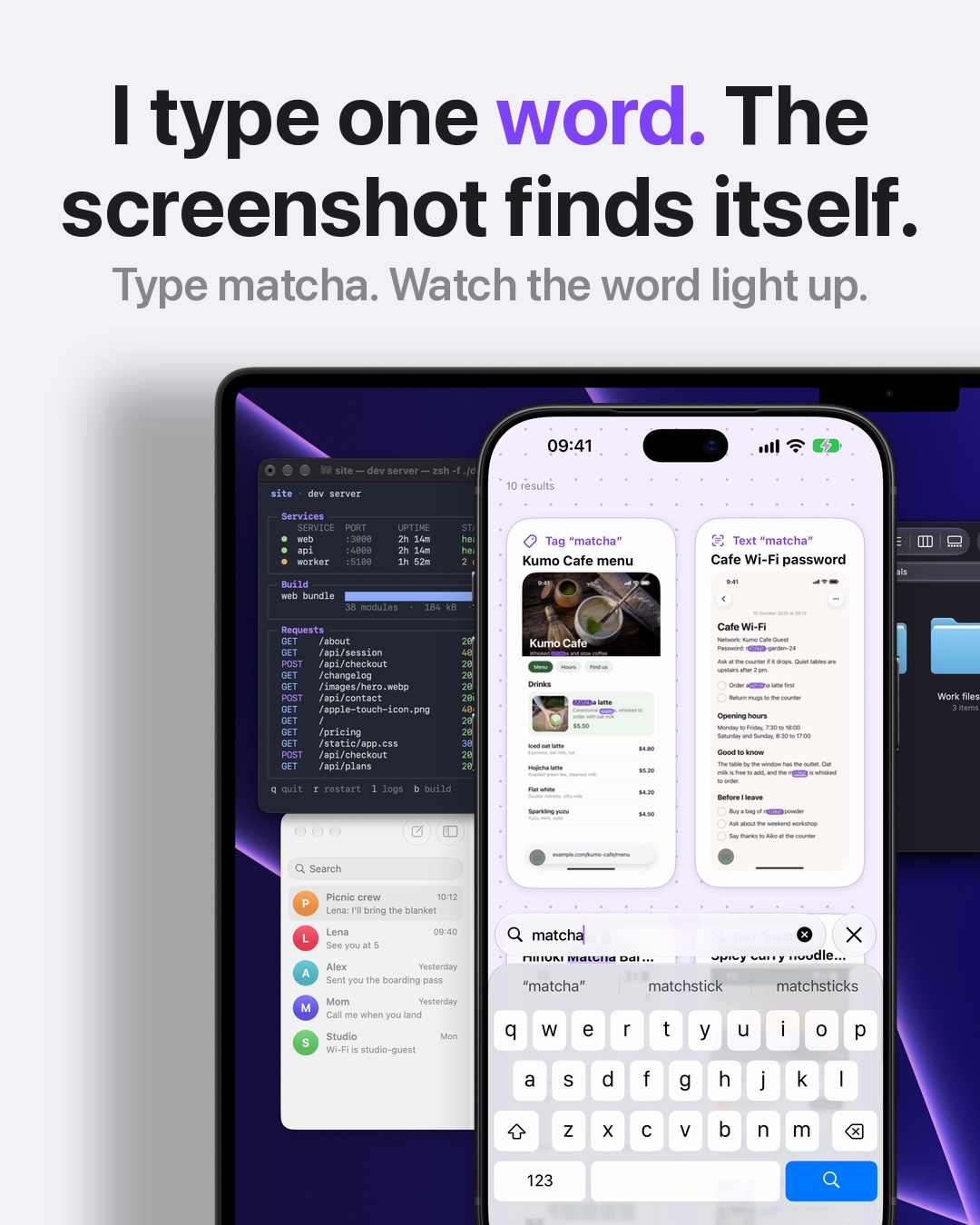
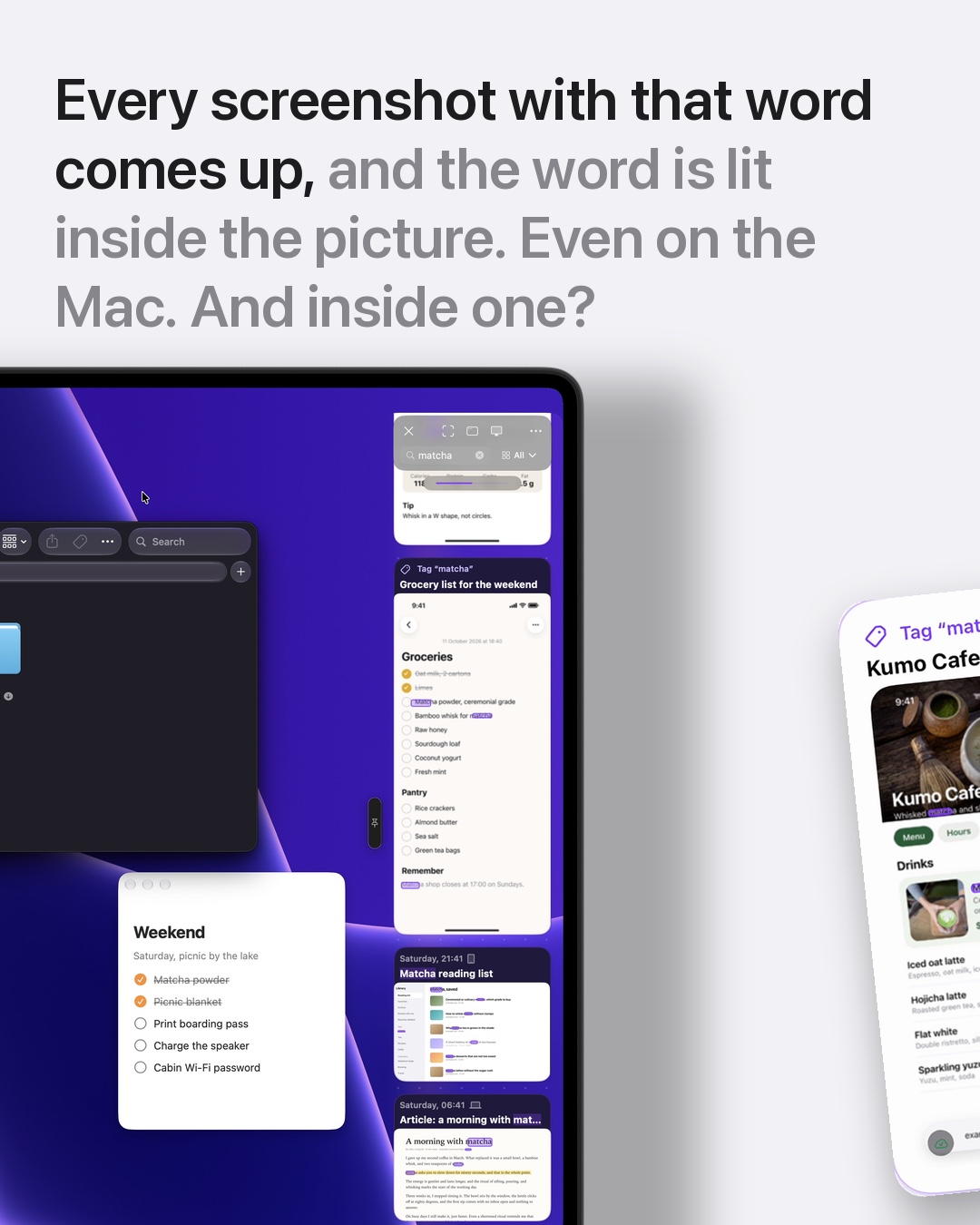
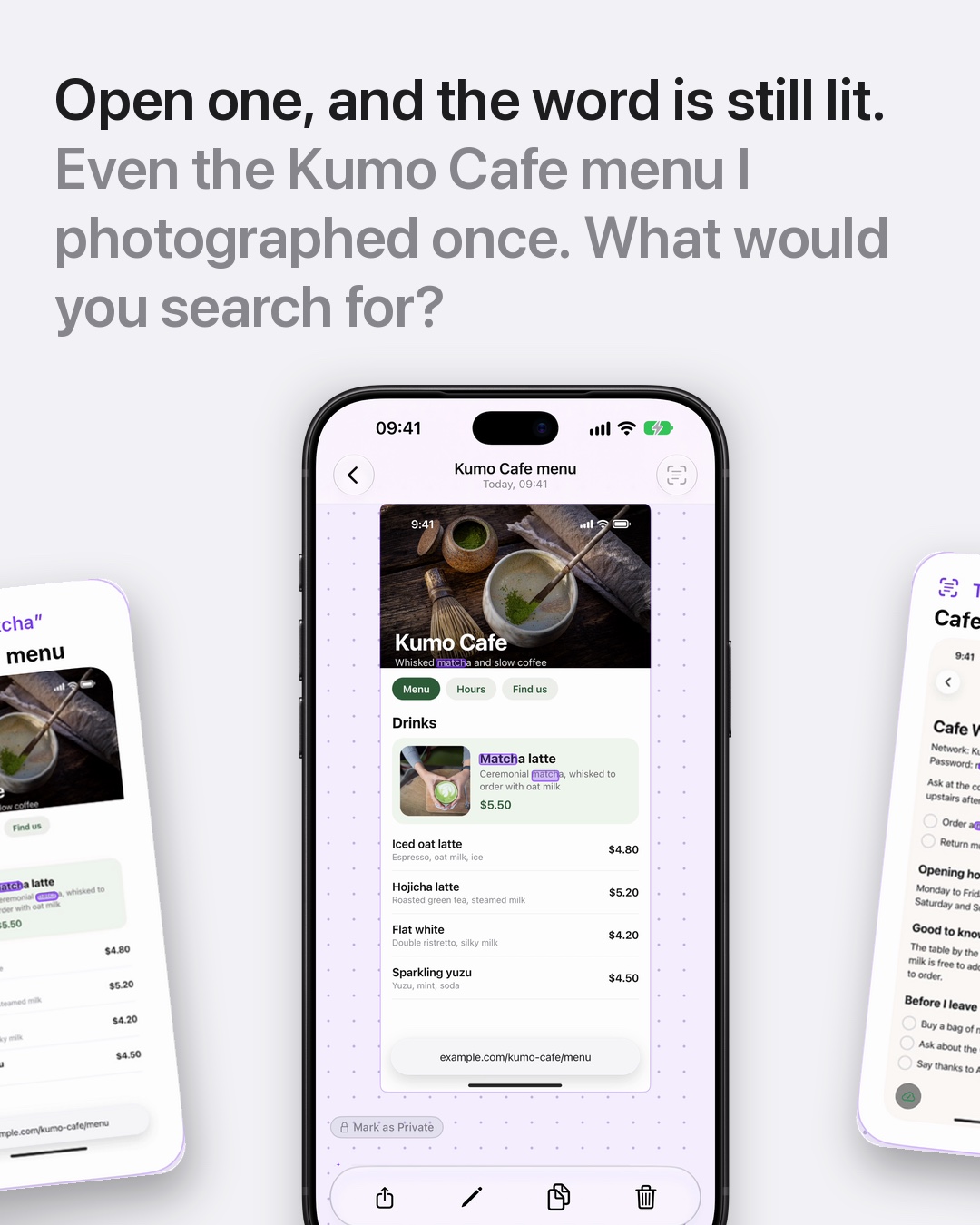

I search text in screenshots instead of scrolling for them: CloudShots reads the words in every screenshot, so I type one word from the picture and the matching screenshots come up on iPhone and Mac, with the word lit inside the image.
Why I stopped scrolling
I take a lot of screenshots: menus, receipts, recipes, error messages, a Wi-Fi password someone read out. A week later I never remember when I took the one I need. I only remember a word that was in it. Scrolling a grid of thumbnails to find that picture is slow and tiring, and file names like "Screenshot 2026-10-12" tell me nothing.
CloudShots is a screenshot app for iPhone, iPad and Mac that I build in my free time. My name is Roman Res, I have been an iOS and macOS developer since 2011, and this pet project started because I wanted to type the word instead of scrolling.
What the slides show
The carousel follows one search from start to finish.
- I type "matcha" into the search field. Every screenshot with that word in it comes up, and the word is lit inside the picture, so I see where it sits in the image.
- The same search works on the Mac, in the CloudShots panel at the edge of the screen. Same library, same word.
- I open a result and the word is still lit. In the example, it is a cafe menu I photographed once and never labelled.
The takes in the slides are staged, so I make no claim about how fast a search is. What matters is the flow: one word in, the right picture out.
How to search text in screenshots with CloudShots
- Take screenshots as usual. CloudShots keeps them in one library on your devices.
- Open the search field in the CloudShots feed on iPhone, or in the panel on your Mac.
- Type one word you remember from the picture, such as a dish, a name or a number.
- Look for the lit word in the results and open the screenshot you meant.
- Refine with a second word if several screenshots share the first one.
There is a full walkthrough in the find text in screenshots guide, and the screenshot history page shows how the library is organised.
Where the reading happens
The text is read on your device. Your library syncs through your own private iCloud, and there are no CloudShots servers holding your screenshots. You can read the details on the privacy page. If you also keep screenshots across devices, sync screenshots between Mac and iPhone explains how the same library shows up on both.
Words that work well
The best search word is the one you remember first. A dish name from a menu, a street from a map, a store from a receipt, a command from a terminal, a name from a chat. Short, distinctive words narrow the results fastest, and a common word such as "the" will match too much to help.
I also use it to clear space: once a word finds a screenshot, I can see at a glance whether I still need it. The free up screenshot space guide covers that side.
What this does not do
Search finds words that are readable in the screenshot. A blurry photo of a sign or handwriting may not come up. When a screenshot has no text at all, you still find it by scrolling the feed, as before.
FAQ
How do I search text in screenshots on iPhone?
Open CloudShots, tap the search field and type a word from the picture. Screenshots containing that word come up, and the word is lit inside each one. CloudShots reads the text on your device.
Does CloudShots search text in screenshots on Mac too?
Yes. The Mac panel has the same search field and the same library as the iPhone, so the word you type finds the same screenshots there.
Do my screenshots leave my devices when CloudShots reads them?
The text is read on your device. Sync uses your own private iCloud, and CloudShots has no servers that store your screenshots.
What if the word I remember is not found?
Try another word from the same picture, or a shorter part of the word. Search matches text that is actually readable in the screenshot, so a very blurry image may not match.
Download on CloudShots.app.
More guides
- How to automatically sync screenshots between Mac, iPhone and iPadOne private screenshot history that syncs both ways through iCloud: Mac to iPhone and iPad, and back.
- How to find a screenshot by the text inside itSearch by the words you remember seeing, on any of your devices.
- How to free up the space your screenshots takeClear synced originals from Photos and your Mac without losing your history.
- CloudShots is an iCloud screenshot manager for Mac, iPhone and iPadWhat lives in your own iCloud, how the library limit works, and what stays private.
- One screenshot history for your Mac, iPhone and iPadOne searchable history of every screenshot from your Mac, iPhone and iPad, synced through your own iCloud. Find any shot and free up storage.
- How to pin a screenshot on screen on MacKeep a screenshot floating above your other windows on Mac with ⌘P. Pin up to 6, move and resize them, close with Esc.
- How to redact or blur text and faces in a screenshot on MacBlur, pixelate or cover text, faces and objects in a screenshot on Mac. Redaction in CloudShots is non-destructive: your original stays untouched.
- How to add a background, padding and shadow to a screenshot on MacExport a Mac screenshot with a background, padding, rounded corners and a shadow using Export with Frame in CloudShots. Copy, save or share the result.
- CloudShots compared with a premium all-in-one capture suiteHow CloudShots compares with a premium, paid all-in-one capture and annotation suite for Mac: history, text search, redaction and pricing.
- CloudShots compared with a floating screenshot toolHow CloudShots compares with a floating, pin-on-screen screenshot tool with a quick library: history, text search, redaction and pricing.
- CloudShots compared with a fast capture and text-recognition utilityHow CloudShots compares with a fast, lightweight capture utility with on-screen text recognition: history, text search, redaction and pricing.
- All guides


TestFlight includes Pro for beta testing. No purchase is required or charged.