What CloudShots Shows About a Screenshot on iPhone, iPad, Mac
By Roman Resenchuk,
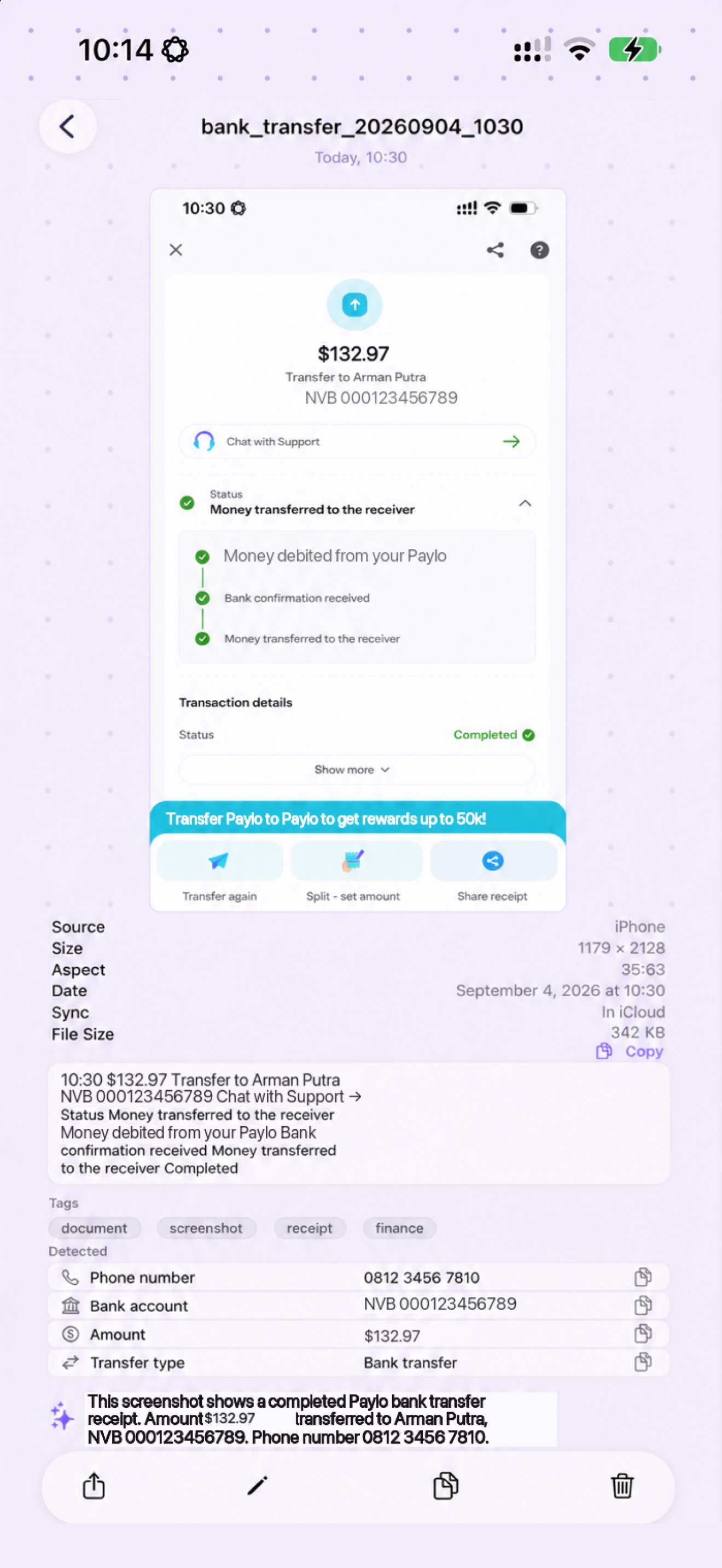
To see screenshot details on iPhone, iPad and Mac, open any screenshot in CloudShots. One screen shows where it came from, its size, date and sync state, the text read from it, the phone numbers and account numbers found in it, and its tags.
CloudShots is a screenshot app for iPhone, iPad and Mac that keeps one private history of your screenshots and syncs it through your own iCloud, and I build it on weekends. This post is about the screen I open most often in my own app, the one that answers "what is this screenshot, really?"
I used to open a screenshot, look at it, and close it. The picture was all I got. Now the picture is the top half of a screen, and everything the app knows about it sits right below.
What the detail screen lists
Under the picture, the facts come first, as a plain list:
- Source: the device that took it, such as iPhone or iPad.
- Size and aspect: the pixel dimensions and the ratio.
- Format, date and file size.
- Sync: whether the screenshot is already in iCloud.
The sync line is the one I check before I delete anything from a phone. If it says In iCloud, the screenshot is safe in my private library and I can free the space. The guide to freeing up screenshot space explains what happens next.
How to read a screenshot's details, step by step
- Open CloudShots and tap or click the screenshot in your feed.
- Read the facts under the picture: source, size, date, sync state and file size.
- Scroll to the recognized text. Tap Copy to take all of it, or Show more to read the rest.
- Look at the Detected rows and the tag chips to see what CloudShots found in the picture.
- Use the buttons at the bottom to share, mark up, copy or delete the screenshot.
That is the whole tour. Nothing needs to be set up first: the text, the tags and the detected rows are read in the background after a screenshot arrives.
What it reads out of the picture
The recognized text is every word CloudShots could read in the image, in reading order. It is read on your device with Apple's Vision framework, and the same text powers search, which the guide to finding text in screenshots describes.
Below the text sits a Detected section. In the bank transfer example, CloudShots flagged one phone number and one bank account number, and each row lists its instances so you can copy just that value. The tags, here finance, transaction, receipt and banking, are short labels for what the screenshot is about.
On devices with Apple Intelligence there is also a short written summary. In my example it says the image is a digital money transfer receipt and lists the amount and the recipient. Without Apple Intelligence you still get the facts, the text, the detected rows and the tags, only the written summary is missing.
The same screen on iPad and Mac
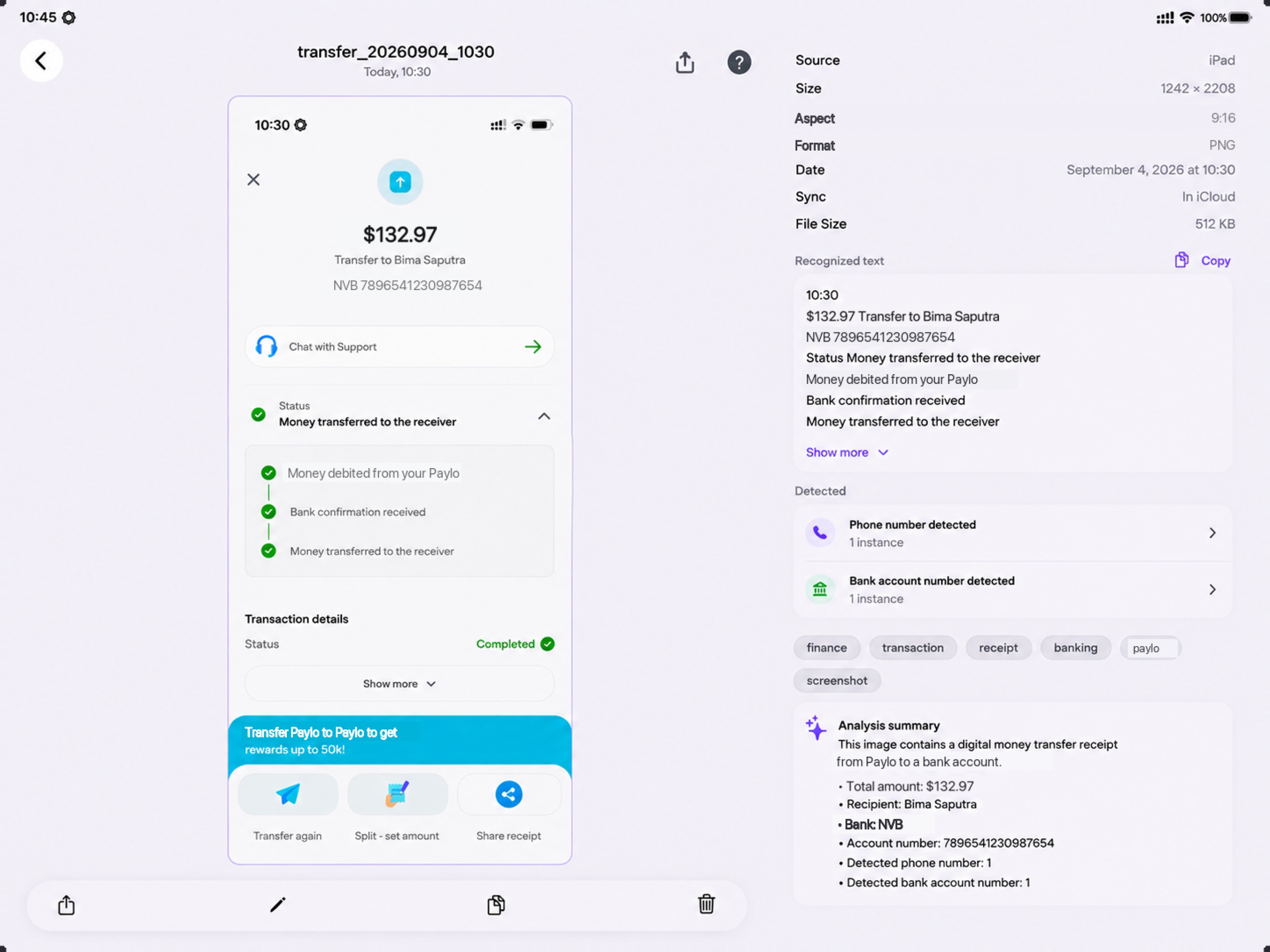
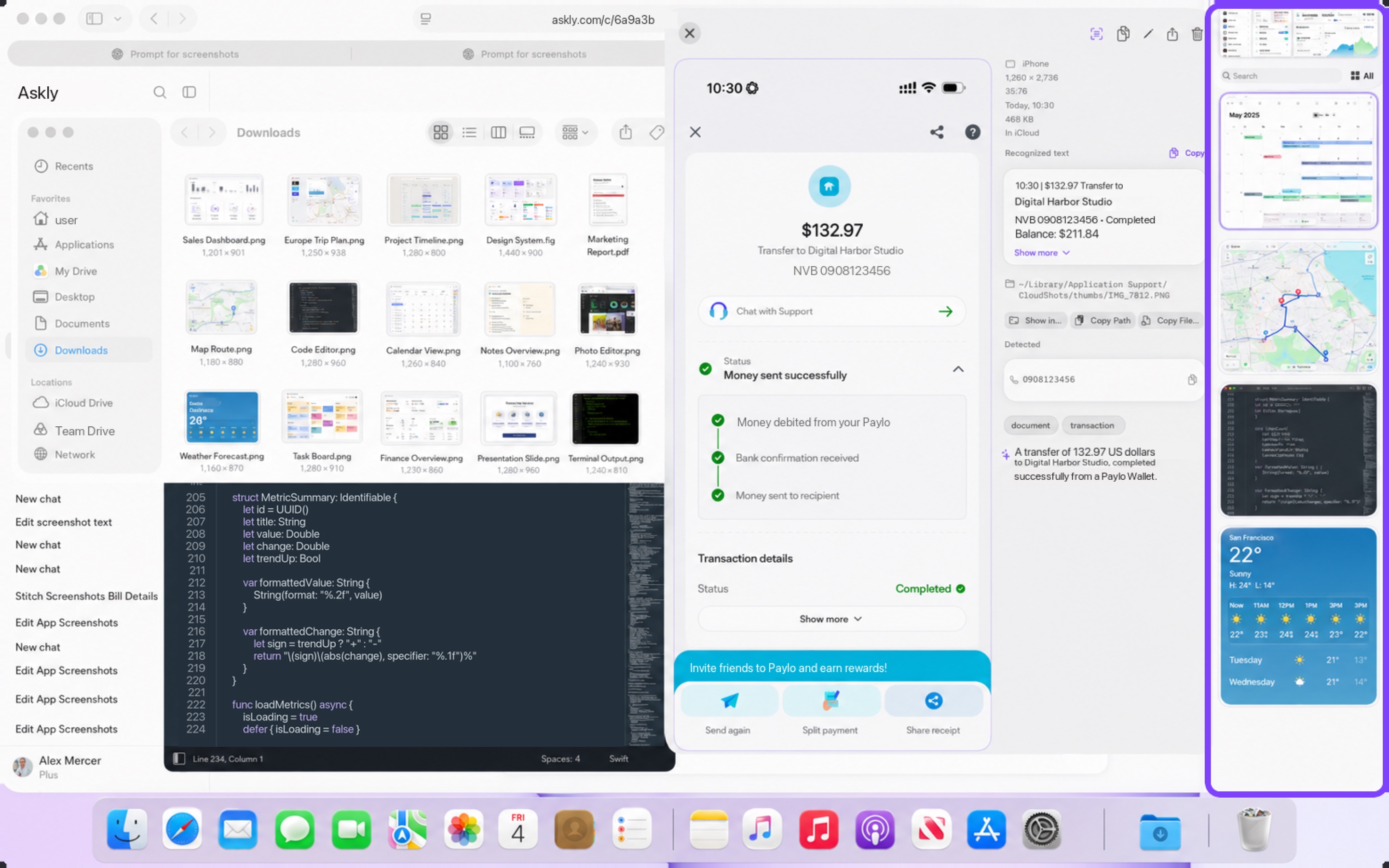
The layout adapts to the device instead of changing the idea. On iPad the picture sits on the left and the whole list of facts, text, detected rows, tags and summary sits on the right, so nothing needs scrolling to start. On the Mac the screenshot opens in a large preview with the same information in a side column, and it adds buttons to show the file, copy its path or copy the file itself.
The photos below show the same kind of screenshot on iPad and on Mac.
What the tour does not do
A few honest limits. The detected rows depend on what the picture contains, so a screenshot with no phone number has no phone row. Recognition is good, not perfect: a blurry or tiny line can come out wrong, so check an account number before you send money to it. The written summary needs Apple Intelligence. And the details describe the screenshot, they never change it: the file in your history stays exactly as it was taken.
Where the reading happens
Text, tags and detected rows are produced on your device. Your screenshots and what is read from them sync through your own private iCloud, and CloudShots has no server that stores them. CloudShots does send diagnostics so crashes can be fixed, and they never include screenshot content. You can turn them off in the app. The iCloud screenshot manager page covers the sync side.
FAQ
How do I see screenshot details on iPhone, iPad and Mac?
Open the screenshot in CloudShots. The details sit under the picture on iPhone, on the right on iPad, and in a side column on Mac.
Does CloudShots show whether a screenshot is already in iCloud?
Yes. The Sync line in the details says In iCloud once the screenshot has been uploaded, so you can check it before you free up space.
Can I copy only the phone number or account number from a screenshot?
Yes. CloudShots lists the detected values as separate rows, and each row has its own copy button, so you take one value and not the whole block of text.
Does the detail screen need Apple Intelligence?
No, except for the short written summary. The facts, recognized text, detected rows and tags work without it. You can download CloudShots and look at one of your own screenshots.
More guides
- How to automatically sync screenshots between Mac, iPhone and iPadOne private screenshot history that syncs both ways through iCloud: Mac to iPhone and iPad, and back.
- How to find a screenshot by the text inside itSearch by the words you remember seeing, on any of your devices.
- How to free up the space your screenshots takeClear synced originals from Photos and your Mac without losing your history.
- CloudShots is an iCloud screenshot manager for Mac, iPhone and iPadWhat lives in your own iCloud, how the library limit works, and what stays private.
- One screenshot history for your Mac, iPhone and iPadOne searchable history of every screenshot from your Mac, iPhone and iPad, synced through your own iCloud. Find any shot and free up storage.
- How to pin a screenshot on screen on MacKeep a screenshot floating above your other windows on Mac with ⌘P. Pin up to 6, move and resize them, close with Esc.
- How to redact or blur text and faces in a screenshot on MacBlur, pixelate or cover text, faces and objects in a screenshot on Mac. Redaction in CloudShots is non-destructive: your original stays untouched.
- How to add a background, padding and shadow to a screenshot on MacExport a Mac screenshot with a background, padding, rounded corners and a shadow using Export with Frame in CloudShots. Copy, save or share the result.
- CloudShots compared with a premium all-in-one capture suiteHow CloudShots compares with a premium, paid all-in-one capture and annotation suite for Mac: history, text search, redaction and pricing.
- CloudShots compared with a floating screenshot toolHow CloudShots compares with a floating, pin-on-screen screenshot tool with a quick library: history, text search, redaction and pricing.
- CloudShots compared with a fast capture and text-recognition utilityHow CloudShots compares with a fast, lightweight capture utility with on-screen text recognition: history, text search, redaction and pricing.
- All guides


TestFlight includes Pro for beta testing. No purchase is required or charged.